herbe warehouse · module
Stock depreciation
Manage stock depreciation from your phone. Create, review and edit depreciation documents in real time.
Already a customer? Sign in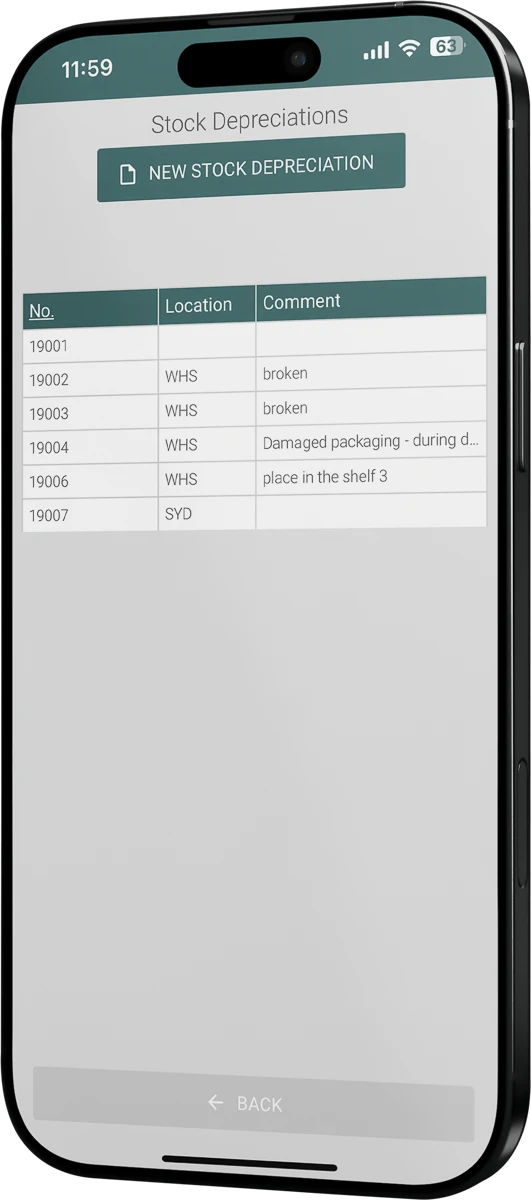
Write it down where you find it
Damaged, expired or lost stock, recorded as it happens.
Built for daily accuracy
Keep the stock value in line with what is really on the shelf.
- Works with Excellent Books and Standard ERP by HansaWorld (known as Excellent ERP in the Baltics, Finland and Norway)
- Create documents on the phone
Register damaged, expired or lost stock at once, while you work in the warehouse.
- Edit location, item and quantity
Adjust the warehouse location, select items and set the exact quantities.
- Review existing entries
Browse the documents you created, open the details and follow the depreciation history at any time.

How to start
Book a demo
Tell us how you write off stock today. We prepare a demo around your setup.
Choose the modules
Pick the warehouse operations you want in the app. Use only what you need.
Fit it to your process
We adjust fields, layouts, filters and workflows to the way your warehouse works.
Questions about stock depreciation
What is the module for?
Registering damaged, expired or lost stock while you are in the warehouse, and creating, reviewing and editing the depreciation documents.
Can I change a document after I create it?
Yes. You can adjust the warehouse location, select items and define exact quantities, and update notes.
How do I find an older depreciation document?
Use the filters: date ranges, locations, suppliers or responsible departments. Then open the document to see its details.
Does it replace paper forms?
Yes. You create and send stock depreciation documents from the app, and the data is kept in step with your ERP in real time.