Stop forwarding PDFs. Start serving customers.
Your customers get 24/7 access to their invoices, orders and contracts, with messaging, payments, e-signing and your own branding.
Already a customer? Sign in
herbe portal · modules
Switch on what your customers ask for
Every module is its own switch. Start with invoices, add quotations and signing when you are ready.
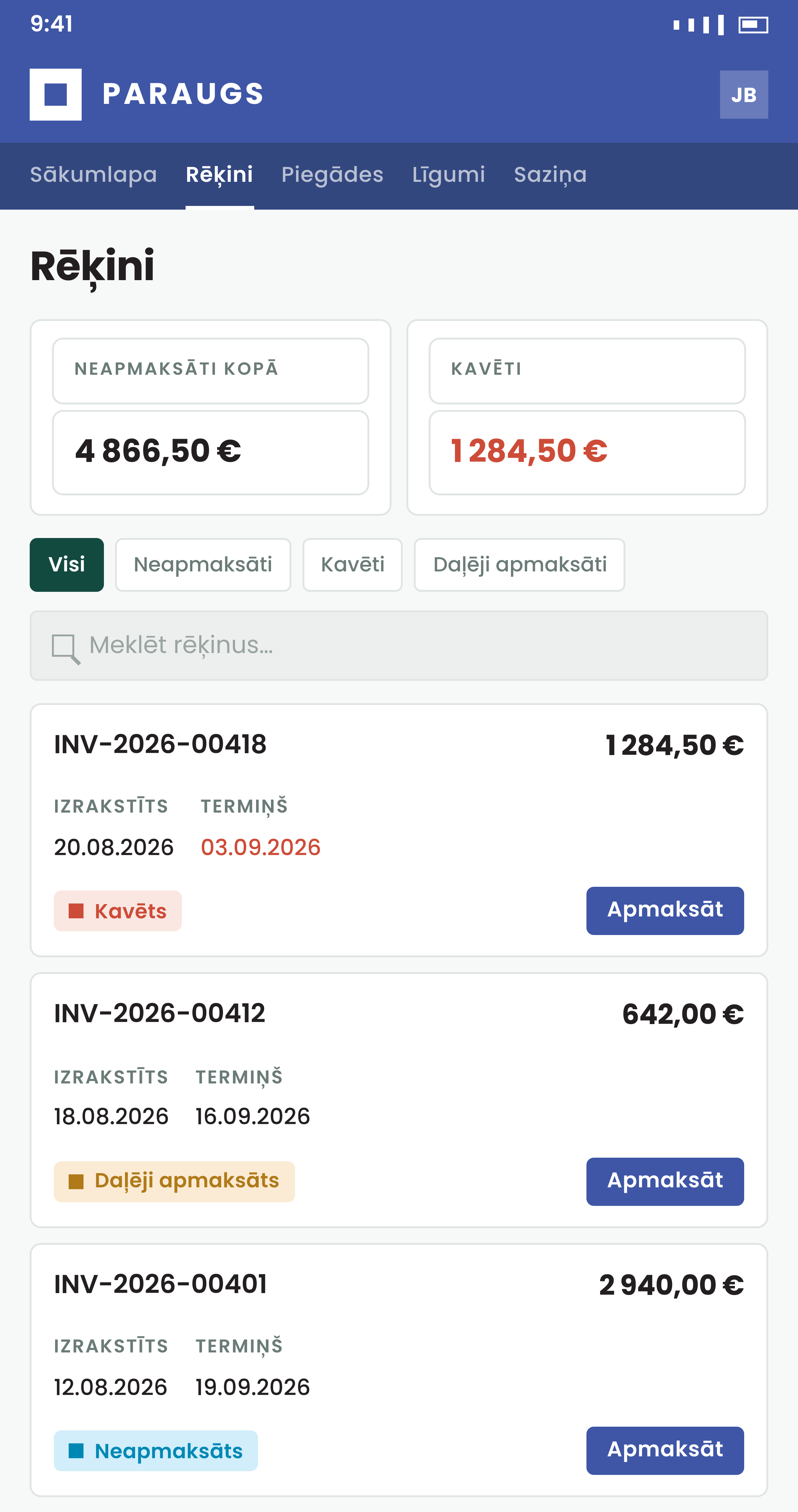
- Invoices & paymentsEvery invoice, the open balance and a pay button in one place.
- Sales ordersWhat was ordered, what has shipped and what is still to come.
- QuotationsCustomers accept or turn down an offer in the portal, not by email.
- ContractsActive agreements, end dates and the signed PDF in one drawer.
- Deliveries & sign-offDelivery notes, and a confirmation that takes one tap or a signature.
- Loan managementApplications, credit agreements and repayment schedules, self-served.
- Service orders & equipmentOrders, worksheets, each machine's history and new requests, in step with herbe service.
- MessagingQuestions, files and replies on the invoice, order or contract itself.
- E-signingSend a document, get it signed on a phone, find it back on the record.
- Office staffYour team opens a customer, answers, sends, signs and asks the assistant, from one screen.
- Your brandYour logo, colours and wording. It looks like your own customer tool.
Less support. Faster payments. Happier customers.
How it works
A thin, branded layer with nothing to migrate
The portal shows your customers the records you already keep and writes their actions straight back. With an ERP, it reads Excellent Books or Standard ERP by HansaWorld (known as Excellent ERP in the Baltics, Finland and Norway) live and the ERP stays the system of record. Without one, it runs on herbe service's own database.
- Frequently viewed records are cached, so pages open fast. The cache is never the source of truth
- Accepted quotes, signed deliveries and payments write back at once, with an audit trail
- Only settings live in the portal: no shadow customer database
Customer sign-in
No new password for your customers
You switch on the sign-in methods you want. Customers use what they already have, so nobody has to invent and remember one more password.
- A Smart-ID, Dokobit or eParaksts sign-in is strong on its own: it asks for no extra code afterwards
- A person the portal cannot match yet lands on a Request access page, and an admin can approve the link
- Emailed link or code
One click from the inbox, or an 8-character code to type when the link opens on another device.
- eParaksts, Smart-ID and Dokobit
Latvian eParaksts, Smart-ID in Latvia, Estonia and Lithuania, and Dokobit, which adds Mobile-ID and eID cards.
- The right records, found for them
These three give the portal the person's personal code. It is matched to the contact on your customer's card, so the right person lands on the right records.
- Passwords, passkeys and Google too
Each is its own switch. An authenticator app can add a second step to a password or an emailed link.
For your own team
Your staff see what the customer sees, and answer from there
Invite your own ERP users as office staff. They open a customer, read the same pages and answer messages, send documents, run e-signings and ask the assistant. An admin sets which customers each person may open.
- Customers never see the staff tools, and staff cannot pay, accept or confirm for a customer
- The Ask button opens the assistant beside the page, with the customer or record already in view
- Answer on the record
Reply to a customer's question under your own name and close the activity when it is done.
- Send invoices and quotations
Email an invoice from the portal, or send a quotation to the customer's contact persons for approval.
- Run the signing
Start a signing on a customer's document, follow who has signed, remind the ones who have not, or cancel it.
Try it
See the portal with your own eyes
A live demo company with real-looking invoices, contracts and statements. Enter your email, get a one-tap link, look around. No password, nothing to install.
- Instant demo: open it now
- Read only, so you cannot break anything
- Or book 30 minutes with us: your branding, your ERP, your questions
herbe ID and herbe assist
herbe ID and herbe assist in herbe portal
Your own staff sign in once through herbe ID and can ask Claude, ChatGPT or Codex about customers from the same account. Customers are not affected: they keep the sign-in methods you switched on.
- Sending an invoice or a quotation, replying on an activity, starting an e-signing: the assistant prepares it and gives an approval link. Nothing reaches a customer until a person presses Approve in the portal
- The assistant has the person's own rights: only the companies and customers their office access covers, and only where you switched AI queries on
- AI is off until an admin switches it on in herbe ID
- Staff also get an Ask button (⌘J or Ctrl+J) that opens herbe assist beside the page and knows which customer or invoice is open
- One sign-in for staff
Office staff and admins sign in through herbe ID, for example with their work Microsoft account (Entra ID).
- Sign out in one place
Sign out of herbe ID, or remove a person there, and their portal session ends within five minutes.
- Ask about customers
Which customers have overdue invoices? What does this customer owe? Which quotes are still open?
Part of herbe.app
One login and one assistant, across the apps
herbe portal signs office staff in through herbe ID and uses herbe assist. Both also serve herbe calendar and herbe service.
- herbe IDOne sign-in for your office staff: Microsoft Entra ID, passkeys or email codes. Customers keep their own.
- herbe assistThe MCP connector for Claude, ChatGPT and Codex, and the Ask panel inside the portal.
- Who may use AIAI starts off for every person and app. An admin switches it on in herbe ID.
Quick answers
Do we need an ERP?
No. The portal works with your ERP, and it also runs on herbe service's own database. Without an ERP you get invoices, quotations and service orders; contracts, sales orders, deliveries and loans come from an ERP.
Can customers change our data?
Only in the ways you allow: pay, accept or reject a quote, confirm a delivery or a job, sign, and write messages. Everything else is read only.
How do customers sign in?
With an emailed link or code, a password, a passkey, Google, Smart-ID, Dokobit or eParaksts, whichever you switch on. Smart-ID, Dokobit and eParaksts identify the person with their eID, so there is no password to remember or reset.
Which signing methods work?
Smart-ID, Mobile-ID, eID card and eParaksts mobile through Dokobit, or the signer's own eParaksts app or ID card through the eParaksts signing service. You choose the provider per company. Deliveries and service orders can also be confirmed with a button or a signature drawn on screen.
Can we use our own logo and colours?
Yes. Logo, colours, font, the name in the browser tab and the "Powered by" line are all yours to set.
Can our staff sign in with herbe ID and use an AI assistant?
Yes. Office staff and admins can sign in to the portal through herbe ID, which also offers a work Microsoft account (Entra ID), passkeys and email codes. Customers keep their own sign-in methods. Once an admin switches AI on, staff can connect Claude, ChatGPT or Codex through herbe assist and ask about invoices, quotes and customers. The assistant works with the person's own access, and anything that goes to a customer waits for an approval link that the person opens and approves in the portal.